
Templates and examples
Templates and examples (🧩 on the start screen) opens a gallery. The document you pick opens as a new, untitled document in your preferred format (OpenDocument or Microsoft Office, chosen on the start screen): save it where you want. The templates are written in the language of the interface (English for languages without a translation of their content).
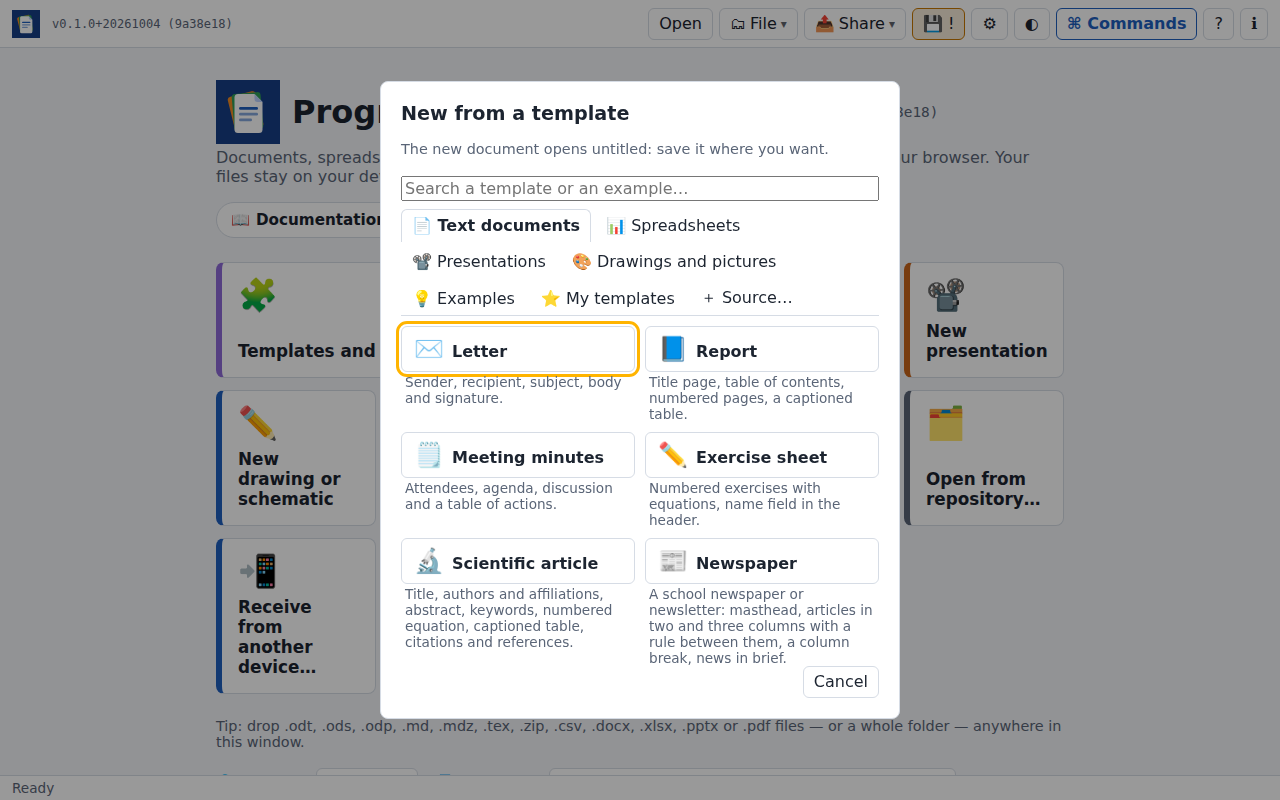
The gallery shows one kind at a time: the tabs at the top — Text documents, Spreadsheets, Presentations, Drawings and pictures, Examples, and My templates or the templates of the open folder when there are some (they come first) — choose which; the arrow keys move from tab to tab. Search a template or an example… looks through all of them by name and description.
Text documents
| Template | What it has |
|---|---|
| Letter | Laid out as usual in its language, each line of an address on its own line, blocks separated by space. In French: sender on the left; recipient, place and date ("Paris, le …") and signature from 9 cm; subject and enclosures; indented, justified paragraphs. In English: block style, everything on the left |
| Report | Title page without header and footer, table of contents, page numbers, a captioned table referenced from the text |
| Meeting minutes | Attendees, agenda, discussion, a table of actions |
| Exercise sheet | Numbered exercises with equations, a name field in the header |
| Scientific article | A4 with 2.5 cm margins, title, authors and affiliations, abstract, keywords, introduction, methods with a numbered equation, results with a captioned table, discussion, conclusion, acknowledgements, citations and the list of references |
| Newspaper | A school newspaper or newsletter on A4 with 15 mm margins: masthead with the issue and the date, an article in three columns with a rule between them and a column break, news in brief, an agenda, an interview in two columns (see Columns) |
Spreadsheets
| Template | What it has |
|---|---|
| Budget | Income and expenses by month, totals, balance, a column chart, frozen headings |
| Grade book | Marks, rounded averages, results computed with IF, class average, COUNTIF |
| Invoice | Items, quantities, unit prices, subtotal, VAT and total, date of the day |
Presentations
Talk: a title slide, an outline, content slides with bullets and speaker notes.
Race signs: start, arrows (right, left, straight on), kilometre marks, water station and finish, each on an A4 landscape page, in letters several centimetres high and high-contrast colours. Print one slide per page and laminate them. Turn them to portrait with the orientation list; the text sizes follow.
Drawings and pictures
Drawings open as pictures, ready for ✏️ Edit the drawing (see Drawings and schematics), saved as .svg:
- Electrical circuit: an RC circuit, a battery charging a capacitor through a resistor, the wires attached to the pins;
- Ladder diagram (LD): start / stop with a holding contact, in the ladder language of IEC 61131-3;
- Grafcet (SFC): a two-step cycle with its transitions and an action;
- Pneumatic circuit: a double-acting cylinder driven by a 5/2 valve (ISO 1219);
- Flowchart: a decision with two branches (ISO 5807).
Pictures, made by the application itself and free to use (CC0), open ready for 🎨 Paint on the picture, saved as .png: Graph paper (a 5 mm grid on an A4 page), Colour wheel, Pixel art (a 32 × 32 canvas).
Examples
A tour of the word processor shows what a text document can hold: formatting, footnotes, a table of contents, an equation numbered and referenced, a captioned table, a Mermaid diagram, a Python code cell and citations with their list of references. Change anything to try it.
Lab report with Python plots mixes text, equations and Python cells (numpy, matplotlib, SymPy): a least-squares fit with error bars, damped oscillations, a Bode plot, a histogram of repeated measurements, a field map and a differential equation solved symbolically. The output and figures are already there when it opens; ⏩ runs every cell again in the browser.
Interactive widgets shows widgets in cells: a slider written in Python with anywidget, made reactive with pwo.ui, drives a plot that is drawn again when the slider moves; a button written in a JavaScript cell counts clicks with a cell that follows it. Press ⏩, then play with them. It also tells how to use the anywidget instruments.
Instrument panel uses the anywidget instruments: its first cell installs them from the wheels published with their demos (you are asked first, then they are kept for offline use); two knobs and a switch, made reactive with pwo.ui, drive a tank, a gauge, a thermometer, a LED and a seven-segment display, then a process line — a pump, a valve and a mixer with their tags, and a stack light — as in their marimo gallery.
Three more examples show the other families of instruments, one each:
- Automation panel — a PID controller tuned with three knobs (
Kp,Ti,Td): the loop is simulated in Python, its step response drawn on a chart beside the controller's faceplate and the overshoot; then a machine following the PackML states, driven by clicking its commands, with a HAND / OFF / AUTO selector and a stack light that follows the state; - Flight instruments — the basic six of a light aircraft (airspeed, attitude, altitude, turn coordinator, heading, vertical speed), in the basic T, set with sliders;
- Car dashboard — speedometer with its limit, rev counter with its red line, gear, fuel and coolant gauges, odometer and tell-tales, set with sliders.
Languages holds one small program in each language the cells run: statistics in Python, Fibonacci numbers in JavaScript, a word count in Lua, a table created then queried in SQL, a sieve of Eratosthenes in C, a sorted ranking in C++, and a linear fit with its plot in R. Press ⏩: each runtime is downloaded the first time, after you agree (see Other languages).
Measurements and charts is a workbook: a damped signal computed by formulas (EXP, SIN) from two parameters you can change, with its line chart, and a linear fit of measurements (SLOPE, INTERCEPT, RSQ, STDEV) with its scatter chart.
The cells of the lab report are Python files in src/templates/lab/<lang>/; after changing them, just template-figures (Python with numpy, matplotlib and SymPy) runs them again and stores their output and figures.
Template files
Template files made by LibreOffice, Word, Excel or PowerPoint (.ott, .ots, .otp, .dotx, .xltx, .potx) open like any file, as a new, untitled document: saving it never changes the template. To make one, choose Save as… › Save as template file (.ott)… (or .dotx, .ots, .xltx, .otp, .potx, depending on the document). Template files can be shared and used in other office suites.
Your own templates
In an open document, Save as… › Save as template… keeps a copy of it in the browser under a name you choose. It then appears first in the gallery, under My templates; ✕ deletes it. Saving again under the same name replaces it.
These templates stay in this browser only (IndexedDB): they are not sent anywhere, and clearing the browser's data deletes them. To share a template, save the document as a file.
Templates in your own repository or cloud
Keep your templates — letters with your letterhead, reports of your team, exercise sheets — in a Git repository (GitHub, GitLab, Gitea / Forgejo) or a Nextcloud / WebDAV folder, and add it to the gallery: + Source… at the end of the tabs offers the repositories and servers you have used, your cloud accounts (then the folder of the templates), or a repository by its address (https://github.com/team/templates/tree/main/letters). The source gets its own tab, read only when you choose it; every document in its folder (and sub-folders) is a template — OpenDocument and Office files and templates, Markdown, LaTeX, CSV, drawings and pictures.
A template picked there opens as a new document, not tied to the repository or the server: save it where you want. A public repository needs no account. A private one is read with a token of its site: when no account of the site reaches it, adding it (or opening its tab later) asks for a token allowed to read the repository, checks it, and remembers it in this browser — or until the application is closed (see Git repositories). ✕ Remove the source, under its templates, takes it out of the gallery (its files are not touched). Shared with a team, the same repository gives everyone the same templates, and Git keeps their versions.
Templates of a folder
When a folder is open, the documents of its Templates folder (also _templates or Modèles, sub-folders included) appear first in the gallery, under Templates of the folder. Choosing one opens a copy: a new document, the template itself staying as it is.
In a folder you can write to, Save as template… asks where to keep the template: in the folder's Templates folder (created if needed), shared with everyone using the folder — a Git repository or a Nextcloud folder, for instance — or in this browser.